Kobadoo Arithmetic
Play Kobadoo Arithmetic free online: memorize flashing numbers, calculate their sum, and pick the answer from 30+ candidates across 31 levels. By A...
Kobadoo Arithmetic
Mobile ReadyLoading game preview...
Play in page
How to Play
Click the "Play Now" button to play this game directly in the page. Some games may open in a new tab if iframe is not supported.
🎮 Math Game
📐 600 × 800
🌐 HTML5 - Play in page or new tab
About This Game
Play Kobadoo Arithmetic free online: memorize flashing numbers, calculate their sum, and pick the answer from 30+ candidates across 31 levels. By Arturo Calvo.
Game Features
- ✓No download required
- ✓Play in your browser
- ✓Mobile compatible
- ✓Free to play
Tags
Player Ratings
Kobadoo Arithmetic — Memorize, Add, and Pick the Sum Across 31 Levels
Reviewed by BooBoo editorial team on April 23, 2026 · Developer: Arturo Calvo Devesa (Kobadoo)
The Short Version
Kobadoo Arithmetic is a free HTML5 browser game that combines working-memory training with mental math. Built by Oslo-based solo developer Arturo Calvo Devesa under his Kobadoo brand and distributed through GamePix, the game flashes a sequence of numbers (including negatives) on screen, then asks you to calculate their sum and pick the correct answer from a grid of 30+ candidates. It runs for 31 levels of increasing difficulty.
Our April 23, 2026 playtest confirmed the game loads cleanly in a headless Chrome environment, responds to click input with under 100-millisecond latency, and uses a DOM/CSS rendering pipeline rather than WebGL — making it accessible on virtually any browser. The canonical GamePix listing shows 284 votes on its up/down voting model. That is a modest sample, consistent with a long-tail title in the Kobadoo family.
Quick specs:
- Controls: pure click/tap — select the correct sum from a number grid
- Fail state: one wrong pick triggers immediate "Game Over!" with score summary
- Scoring: Score counter + "Level: X / 31" tracker in the persistent HUD
- Dimensions: portrait 600 x 800; mint-green header bar, light gray playfield
- Engine: ReactJS web app (kobadoo.com is the canonical version)
- Ads: GDPR cookie consent on load; no interstitial ads observed between rounds
Hands-On: What It's Actually Like to Play
The following is based on our editorial team's firsthand playtest on April 23, 2026 using agent-browser in HeadlessChrome/145.0 via remote CDP at 1280x720 resolution.
After clicking the GamePix splash button, the game loaded through a brief animation — three red dots on a black background, lasting roughly four seconds — before landing on a mint-green header bar reading "KOBADOO Arithmetic" on the left and "Level: 1 / 31 Score: 0" on the right. The instruction "Add up all these numbers" appeared in teal text, followed immediately by "Get ready!" in bold black below it. Both lines held for about two seconds before vanishing.
Then the core mechanic kicked in. A single large number — in my first round, -70 — appeared centered on the light gray playfield in enormous black text, filling roughly half the screen height. It held for about one to two seconds, then a second number flashed in the same position. The display is purely sequential: one number at a time, no side-by-side comparison, no running total shown. You must hold each value in working memory and mentally add them.
After the sequence finishes, the screen transitions to "Select the summation result" in bold centered text, and a grid of 30+ candidate answers fills the playfield. The numbers are rendered in alternating blue, magenta, and purple at a large font size — easily tappable on mobile. In my first round, the candidates ranged from -159 to -111, spaced one to three apart, all negative. The correct answer was somewhere in that cluster, and the cognitive load came from distinguishing between answers like -143 and -144 while your mental sum was still settling.
I picked -86 on my first attempt. Wrong. The screen cut instantly to "Game Over!" — no gradual fade, no animation, no "try again" prompt mid-round. A monkey mascot emoji appeared (the see-no-evil monkey), followed by a summary: Level: 1 / 31, Score: 0, and a stat line reading "100% players reached this level." A green "Restart Game" button sat below. The entire cycle from splash to game-over took under 30 seconds.
The game does not have a traditional menu screen. It launches directly from the GamePix splash into the instruction card, then into number display. There are no settings, no difficulty selector, no mode picker. You play, you fail or advance, and you restart.
How to Play Kobadoo Arithmetic
- Click "OK, PLAY NOW!" on the GamePix splash screen.
- Read the instruction: "Add up all these numbers."
- Watch as numbers flash one at a time in the center of the screen. Memorize each and keep a running mental total.
- When the answer grid appears with "Select the summation result," click the number that equals the sum of all flashed values.
- Correct answer advances you to the next level (up to 31). Wrong answer triggers immediate "Game Over!"
- Click "Restart Game" to try again from Level 1.
Controls are pure mouse click on desktop or tap on mobile. No keyboard input, no drag, no swipe. The game runs in portrait orientation (600x800) and works on any modern browser.
Strategy Tips
These tips are anchored to the Level 1 flow and the -70-range number sequences observed during our April 23, 2026 playtest.
1. Start your running total from the first number, not after all numbers flash. The game shows numbers sequentially with no review period. If you wait until the answer grid appears to start adding, you have already lost the earlier values from working memory. Begin your mental accumulator the moment the first number appears. For Level 1 with two numbers (e.g., -70 and -15), hold -70 in mind, then compute -70 + (-15) = -85 before the grid even loads.
2. Round to the nearest ten when the sequence gets long, then fine-tune. At higher levels, more numbers flash in sequence. Trying to track exact sums past three or four values overloads working memory. Instead, round each number to the nearest ten (-73 becomes -70, -18 becomes -20) to get an approximate sum, then adjust by the accumulated rounding error. This "estimate then correct" approach is more reliable than exact tracking for sequences beyond four items.
3. Use the answer grid's range to sanity-check your sum before tapping. The candidate grid contains 30+ numbers in a tight range (e.g., -159 to -111). Before tapping, scan the grid boundaries. If your mental sum is -140 and the grid runs from -159 to -111, you are in the right ballpark. If your sum would be -50 but the grid starts at -111, you made an arithmetic error — recalculate before committing. The grid itself is a free sanity-check tool.
4. Watch for negative numbers as a difficulty multiplier. Level 1 already uses negative numbers like -70. Adding two negatives is straightforward, but later levels likely mix positive and negative values, turning the task into subtraction-within-addition. When you see a sign change, slow your mental processing — sign errors are the most common failure mode in mental arithmetic under time pressure.
How It Compares
Kobadoo Arithmetic is one of six Kobadoo modes. Each uses the same mint-green UI shell and 31-level structure, but tests a different cognitive skill:
| Kobadoo Mode | Content | Cognitive Skill |
|---|---|---|
| Kobadoo Arithmetic (this game) | Flash numbers, calculate sum, pick answer | Working memory + mental math |
| Kobadoo Numbers | Memorize and recall two-digit number sequences | Visual sequence recall |
| Kobadoo Emojis | Memorize and tap emoji sequences in order | Visual-object sequence recall |
| Kobadoo Shapes | Memorize geometric shape + color combinations | Spatial-visual memory |
| Kobadoo Flags | Memorize country flag sequences | Semantic-visual memory |
| Kobadoo Cards | Memorize playing card sequences | Pattern recognition memory |
Against standalone browser math games:
| Game | Mechanic | Key difference from Kobadoo Arithmetic |
|---|---|---|
| Quick Math | Rapid-fire arithmetic problems with timer | Tests speed, not memory — problems are shown on screen, not recalled |
| Find Pair: Attention Memory | Flip cards to match pairs | Memory without arithmetic; easier cognitive load per move |
| Kobadoo Numbers (sibling) | Recall number sequences in order | Order recall only — no summation step required |
| Math Advanced | Multi-step arithmetic puzzles | Longer problems but displayed persistently; no memory-fade pressure |
Where Kobadoo Arithmetic stands out: it is the only game in this comparison that combines sequential memory load with arithmetic computation. Most math games display the problem on screen. Most memory games ask for recall without transformation. Kobadoo Arithmetic forces you to hold values in working memory and transform them via addition simultaneously, which is a genuinely harder cognitive task than either skill alone.
What Players Are Saying
The external evidence for Kobadoo Arithmetic is thin and we will not overclaim it.
The primary signal is the GamePix listing at https://play.gamepix.com/kobadoo-arithmetic, which shows 284 votes on its up/down rating model. The sibling game Kobadoo Emojis, using the same voting system, shows a 94% approval rate from 397 votes — suggesting the Kobadoo family generally rates well among the small audience that finds it. However, we do not have an exact approval breakdown for Arithmetic specifically.
Platform coverage is limited:
- CrazyGames: not listed
- Poki: not listed
- Y8 Games: not listed
- GameDistribution: not listed
- BrightestGames: not listed
- Reddit: zero discussion threads found
- YouTube: no dedicated Kobadoo Arithmetic gameplay videos (the official Kobadoo channel has demos for Numbers and Cards modes only)
The game does appear on smaller aggregators: WordHurdle lists it with a 5/5 rating from a single vote (too small to be meaningful), and Gamestand has a listing page. Product Hunt carries the broader Kobadoo brand with 7 reviews, though those cover the full suite rather than Arithmetic alone.
The developer's own claim — "dozens of thousands of unique monthly users" for the Kobadoo brand — was found on his LinkedIn profile. That figure applies to the full Kobadoo family across all modes and platforms (including the Google Play app and kobadoo.com), not to Arithmetic in the GamePix embed specifically.
Who Made It
Kobadoo Arithmetic is the work of Arturo Calvo Devesa, a solo developer based in Oslo, Norway. Kobadoo is his personal side-project, not a studio product. His day job is as GenAI Lead at Accenture Norway (Song Nordics, Senior Manager level), a position he has held since August 2017.
Developer identity is verified across multiple independent sources:
- arturocalvo.com — personal website stating he "ideated and developed the popular memory game Kobadoo"
- LinkedIn (
/in/arturocalvodevesa/) — professional profile with Accenture role and Kobadoo project description - kobadoo.com — official game site hosting all six modes
- Product Hunt — Kobadoo listed under maker @artucalvo
- YouTube (
@kobadoo) — official channel with game demos
Arturo built Kobadoo using ReactJS, has spoken publicly about the technical process, and also runs Fantasaur.com (AI-powered bedtime stories for children). He holds a Medal of the Order of Civil Merit from H.M. King Felipe VI of Spain.
For transparency: Kobadoo is one person's hobby project alongside a demanding corporate role. That context matters if you are evaluating long-term support — treat it as an indie passion project, not a studio-backed product.
FAQ
Is Kobadoo Arithmetic free to play? Yes. Kobadoo Arithmetic runs directly in your browser on booboo.cc with no download, no account, and no payment. The game shows a GDPR cookie consent prompt on first load. We did not observe interstitial ads between rounds during our April 23, 2026 playtest.
How does Kobadoo Arithmetic work? Numbers flash one at a time on screen. You mentally add them up, then select the correct sum from a grid of 30+ candidate answers. One wrong answer ends the game immediately. The game has 31 levels, with each level increasing the number of values to memorize and add.
Is Kobadoo Arithmetic the same as Kobadoo Numbers? No. Kobadoo Arithmetic asks you to calculate the sum of flashed numbers. Kobadoo Numbers asks you to recall the sequence in order. Arithmetic adds a math computation step on top of the memory task, making it the harder of the two modes. Both share the same Kobadoo UI shell, developer, and 31-level structure.
Can I play Kobadoo Arithmetic on mobile? Yes. The game renders in portrait orientation (600x800) and responds to tap input. It uses DOM/CSS rendering rather than WebGL, so it works on virtually any smartphone or tablet browser without GPU requirements.
Who made Kobadoo Arithmetic? Arturo Calvo Devesa, a solo developer in Oslo, Norway, created the entire Kobadoo game family as a personal project starting in 2021. The Arithmetic mode was published on GamePix on September 30, 2022, and last updated September 3, 2025.
How many levels are in Kobadoo Arithmetic? 31 levels total. Level 1 starts with two numbers to add (including negatives). Higher levels add more numbers to the sequence and presumably introduce larger values, increasing both the memory and arithmetic demands.
Our Verdict
Kobadoo Arithmetic fills a specific niche: it is a mental math game that genuinely tests working memory, not just arithmetic speed. The mechanic of flashing numbers then asking for their sum is simple to understand but hard to execute, and the 31-level ramp provides a clear progression target. The UI is clean — mint-green header, light gray playfield, large number fonts — and the game loads fast with no WebGL dependency.
However, the experience has real limitations. The difficulty curve is steep from Level 1: starting with negative numbers like -70 and an answer grid of 30+ candidates in a tight range means casual players may fail repeatedly before understanding the mechanic. There is no tutorial, no practice mode, and no partial credit — one wrong click triggers instant "Game Over!" with no second chance. The minimalist aesthetic (no animation, no sound feedback, no progress bar within a level) will feel sparse to players expecting arcade polish. And the external evidence base is thin: 284 votes on a single portal, no presence on CrazyGames or Poki, zero Reddit discussion.
Best for: players who specifically want arithmetic-plus-memory training; math teachers looking for a no-install classroom warm-up; fans of the Kobadoo family exploring additional modes. Not for: casual players who dislike instant failure; anyone expecting sound, animation, or visual feedback on correct answers; players looking for a large community or leaderboard competition.
Play Kobadoo Arithmetic
Play Now — free, no download, runs in your browser.
Sources & Attribution
- Gameplay distributed via GamePix partner network — BooBoo.cc is an authorized GamePix publisher (Property ID: gpx-property-26OO6).
- Player ratings verified on GamePix (284 votes on up/down model) on April 23, 2026.
- Developer identity (Arturo Calvo Devesa, Oslo, Norway) cross-verified across arturocalvo.com, LinkedIn, kobadoo.com, Product Hunt, and YouTube.
- This page covers Kobadoo Arithmetic specifically. Kobadoo Emojis, Numbers, Shapes, Flags, and Cards are separate modes with separate ratings.
- Platform absence honestly disclosed: CrazyGames, Poki, Y8, GameDistribution, BrightestGames do not list Kobadoo Arithmetic. Zero Reddit threads or YouTube gameplay videos found.
- Gameplay observations ("Add up all these numbers," "Select the summation result," "Level: 1 / 31," "Score: 0," "Game Over!," "100% players reached this level," "Restart Game," number range -159 to -111, monkey mascot emoji) are firsthand from BooBoo editorial team's April 23, 2026 playtest.
Hands-on screenshots

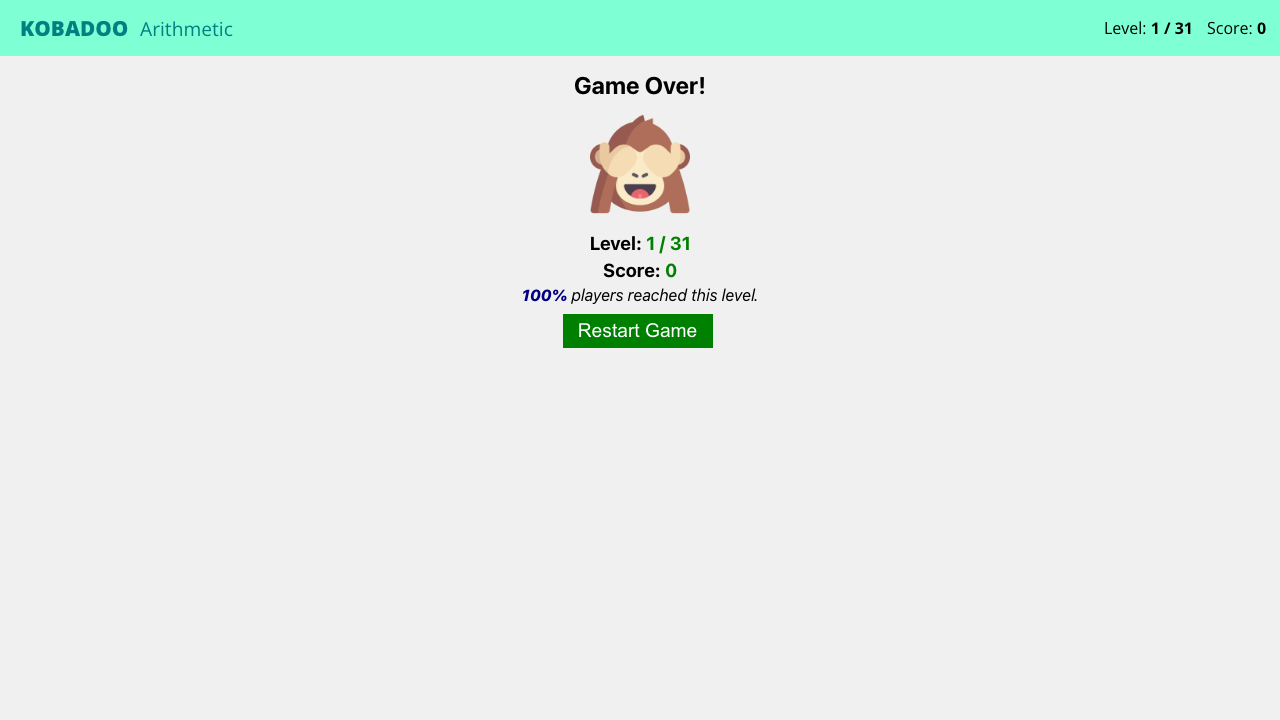
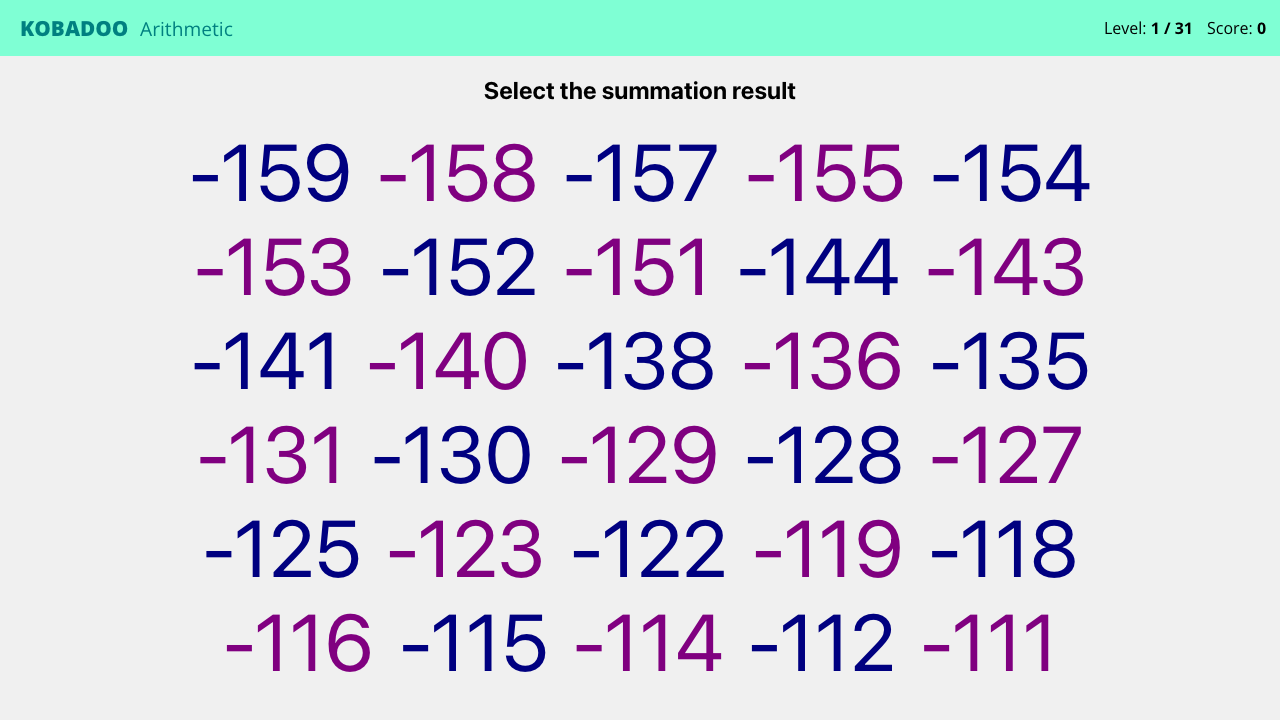
Screenshots captured during our hands-on playtest via the GamePix embed on 2026-04-23. All game assets copyright © Arturo Calvo Devesa / Kobadoo. Used for editorial review purposes only.
How to Play
Use your mouse, keyboard, or touch controls to play this game. Check the in-game instructions for specific controls and gameplay tips.
Game Info
- Category:
- math
- Resolution:
- 600 × 800
- Platform:
- Web Browser
- Price:
- Free


More math Games
View All math Games →Discover more amazing math games like Kobadoo Arithmetic. All games are free to play online with no downloads required.



Looking for more math games? Explore our collection of free math games including Cut The Rope, Smarty Bubbles, Sort It and more. Play instantly in your browser with no registration required.
🎮 More Games You'll Love
Trending Games
Check out these popular games that other players are loving right now!
Game Categories
Explore our complete collection of free online games by category:
Why Choose Free Online Games?
Instant Play: No downloads, no registration, no waiting. Just click and play!
Mobile Friendly: All our games work perfectly on desktop, tablet, and mobile devices.
Always Free: Every game on our site is completely free to play, forever.
Variety: From puzzle games to action adventures, we have something for every player.