Bouncing Bug
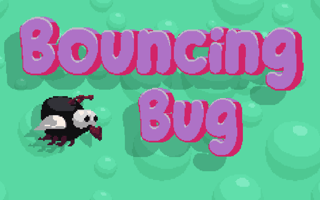
Play Bouncing Bug free online. Tap to bounce a pixel-art bug across shifting terrain, dodge spiky enemies, and collect gold coins. No download, ins...
Bouncing Bug
Mobile ReadyLoading game preview...
Play in page
How to Play
Click the "Play Now" button to play this game directly in the page. Some games may open in a new tab if iframe is not supported.
🎮 Arcade Game
📐 800 × 600
🌐 HTML5 - Play in page or new tab
About This Game
Play Bouncing Bug free online. Tap to bounce a pixel-art bug across shifting terrain, dodge spiky enemies, and collect gold coins. No download, instant play.
Game Features
- ✓No download required
- ✓Play in your browser
- ✓Mobile compatible
- ✓Free to play
Tags
Player Ratings
Bouncing Bug — A One-Touch Pixel Arcade Collect-a-thon
Published November 22, 2022 · Last updated November 24, 2022 · Reviewed by BooBoo Editorial on April 23, 2026
Introduction
Bouncing Bug is a browser-based 2D arcade game built with Construct 3 where you guide a small pixel-art bug across auto-scrolling terrain. Your only control is a single tap — click or tap anywhere to make the bug bounce upward, and gravity pulls it back down. The objective is straightforward: collect gold star coins and food pickups while dodging round, spiky enemy creatures that cost you one of your three lives on contact. The terrain shifts color as you progress — from green meadows to sandy dunes to purple hills — and enemy density increases with each transition. Built by solo indie developer Pierpaolo Tausani (PitiGameDev) from Rome, Italy, the game holds an 8.8/10 rating from 191 votes on GamePix and is also listed on Y8.
Hands-On: What It's Actually Like to Play
The following describes our editorial team's firsthand playtest on April 23, 2026.
After the GamePix wrapper loads with the "好,开始游戏!" button and a brief "Pi Ti Dev" splash screen, the main menu appears: the title "Bouncing Bug" in bubbly purple text against a yellow background with floating circular shapes. Three buttons sit at the bottom — "PLAY", "AUDIO", and "SHOP" — with a pixel-art bug character standing on the right side of the screen.
Hitting PLAY drops you straight into the game. No tutorial screen, no instruction overlay — you figure out the tap-to-bounce mechanic within the first second because the bug immediately starts falling. The HUD is minimal: three small bug-shaped life icons in the top-left corner (they grey out when you lose a life) and a coin counter in the top-right showing "000" alongside a gold star icon.
The first terrain is green with scattered circular mounds of varying size. White particle effects drift across the screen. Gold star coins float at different heights, and the bug auto-scrolls rightward at a steady pace. Each tap produces a small upward hop — chain taps to stay airborne, or stop tapping to let the bug descend toward ground-level pickups.
Within about 30 seconds, the terrain color shifts to sandy brown and the first enemy appears: a round blue spiky ball with small horns. Contact costs one life instantly — the life icon in the HUD greys out without fanfare. A food pickup (it looks like a ham or piece of meat) also appears on the field, though its exact function during my playtest was unclear — likely a health restore based on the genre convention.
By the time the terrain turns purple, the coin counter reached "009" and one life was already lost. The mounds become denser, the spacing tighter, and the enemy placement more aggressive. A single run lasted roughly 60-90 seconds before all three lives were spent. Restarting is instant — tap through the menu and you are back in within 2 seconds.
The "SHOP" button on the main menu suggests coin-based cosmetic unlocks (different bug skins), giving the coin collection a secondary purpose beyond score tracking. A persistent "AUDIO" toggle sits in the bottom-right during gameplay, and a bottom banner ad (in my session, an IXL math program promotion) appeared once during active play without interrupting the game.
How to Play / Controls
Bouncing Bug uses a single-input control scheme:
- Tap or click anywhere on the screen to bounce the bug upward
- Stop tapping to let gravity pull the bug down
- The bug auto-scrolls rightward — you cannot move left, speed up, or slow down
- Chain taps for sustained altitude; single taps for small hops
- Avoid blue spiky enemies (contact = lose 1 life)
- Collect gold star coins and food pickups
- The game ends when all 3 lives are lost
There are no keyboard controls. The mouse or touchscreen is the only input. Response time feels near-instant — under 200ms from tap to visible bounce.
Strategy Tips (From Our Playthrough)
1. Tap in short bursts rather than holding a rhythm. The bug's bounce height is consistent per tap, so rapid tapping sends it too high and you overshoot coins. Two quick taps followed by a pause gives the best altitude control for mid-level coin collection.
2. Stay mid-screen whenever possible. Ground-level flying means less reaction time when enemies scroll in from the right edge. Keeping the bug at screen center gives you roughly 400ms to adjust altitude in either direction when a blue enemy appears.
3. Learn the terrain color transitions as difficulty markers. Green terrain is safe to explore and collect freely. Once the terrain shifts to brown, start prioritizing enemy avoidance over coin collection. By the purple terrain, treat every coin pickup as a calculated risk — some are placed directly adjacent to enemies as bait.
4. Save the SHOP cosmetics for motivation, not strategy. The coin-to-skin unlock system does not appear to affect gameplay stats. Use it as a progress reward between runs rather than a strategic goal — chasing a distant skin unlock makes you take unnecessary risks for coins.
How Bouncing Bug Compares to Similar Games
Bouncing Bug sits in the one-touch arcade niche alongside several browser-based alternatives:
| Game | Platform | Control | Key Difference |
|---|---|---|---|
| Bouncing Bug (this game) | GamePix, Y8 | Tap to bounce | Terrain color shifts, enemy dodge + coin collect |
| Bouncing Egg | GamePix | Tap to bounce | Egg character, similar physics, tighter level design |
| Birdie Bounce | BooBoo | Tap to fly | Bird character, vertical focus, no enemies |
| Boing Bang | GamePix | Physics-based | Bounce pads, puzzle-oriented rather than endless |
| Flappy Bird (genre benchmark) | Mobile | Tap to flap | Pipe obstacles, no collectibles, higher difficulty |
The clearest differentiator for Bouncing Bug is its terrain progression system — the color shifts from green to brown to purple create a visible sense of advancement that most one-touch runners lack. The enemy variety is limited (only the blue spiky ball was observed), which is a downside compared to games with richer obstacle catalogs.
What Other Players Say
External coverage for Bouncing Bug is limited. The game appears on a handful of HTML5 game portals but lacks presence on major aggregators like CrazyGames or Poki.
- GamePix: 8.8/10 from 191 player votes — 184 upvotes, 7 downvotes, a 96.3% approval rate (source, verified April 23, 2026)
- Y8: Listed since December 18, 2022 — no visible rating or play count (source)
- Gamebol (GameDistribution partner): 5/5 stars from 3 votes, 3,000 plays — listed March 8, 2024 (source)
No Reddit threads, YouTube gameplay videos, or blog reviews were found as of April 2026. The game has very low external visibility — it is essentially a niche GamePix title with minimal cross-platform distribution. The Gamebol vote-to-play ratio (3 votes from 3,000 plays) contrasts sharply with GamePix (191 votes from 98 plays), suggesting different audience engagement patterns across platforms.
Who Made It
Developer: Pierpaolo Tausani, a solo indie developer based in Rome, Italy, operating under the brand PitiGameDev. His Itch.io bio reads: "I'm a solo indie dev that make games. I hope you will enjoy them!"
Tausani is a prolific creator with a catalog of 61+ games across multiple platforms including GamePix, Y8, PacoGames, and Games44. His other titles include Purrrification (a platformer that launched on Steam), Deep in the Lab (a 2D survival horror), Towerland (a fantasy roguelite), Jetpack Kiwi (a side-scrolling shoot-em-up), and Toilet Paper Please (an avoid-and-collect game with 100+ levels).
Engine: Construct 3 (HTML5) Published via: GamePix partner network Available on: GamePix, Y8, Gamebol, and several smaller HTML5 aggregators
Frequently Asked Questions
Is Bouncing Bug free to play? Yes. Bouncing Bug runs directly in your browser — no download, no account creation, no purchase required. The game is monetized through banner ads that appear during gameplay.
Does Bouncing Bug work on mobile? Yes. The game is designed for both desktop and mobile browsers. The one-touch tap control works natively on touchscreens. The landscape orientation means playing on a phone in horizontal mode works best.
How long is a typical run in Bouncing Bug? A single run lasts approximately 60 to 90 seconds for average players. The game is endless, so experienced players who avoid enemies consistently can extend runs further. The short run length makes Bouncing Bug ideal for 2-minute play sessions.
What does the SHOP do in Bouncing Bug? The SHOP lets you spend collected coins on cosmetic skins for your bug character. These are visual-only changes and do not affect gameplay mechanics or difficulty.
Who developed Bouncing Bug? Bouncing Bug was created by Pierpaolo Tausani, a solo indie developer from Rome, Italy, operating as PitiGameDev. He has published over 60 games across various HTML5 platforms.
Can I play Bouncing Bug offline? No. The game requires an internet connection to load the Construct 3 engine and serve in-frame ads.
Our Verdict
Bouncing Bug delivers exactly what its name promises: you bounce a bug. The one-touch mechanic is immediately accessible, the pixel art has a homemade charm, and the terrain color progression (green → brown → purple) gives each run a sense of forward momentum that pure-score endless runners often lack. The GamePix community awarded it an 8.8/10 — a strong score that reflects the game's polish-to-simplicity ratio.
However, the mechanical depth is genuinely thin. There is only one enemy type (the blue spiky ball), no power-ups activate during gameplay, and the coin counter serves as the only score metric with no distance tracker or high-score display in the HUD. After three or four runs, you have seen everything the game offers mechanically. The SHOP provides cosmetic motivation, but not for players who want deepening challenge. Bouncing Bug is a 5-minute diversion, not a 50-minute session game — and that is an honest framing of what it does well and where it stops.
Best for: Quick-break casual players, fans of Flappy Bird-style one-touch games, mobile browser users. Not for: Players seeking mechanical progression, leaderboard competition, or strategic depth.
Play Bouncing Bug
Play Now — free, no download.
Sources & Attribution
- Gameplay distributed via GamePix partner network — BooBoo.cc is an authorized GamePix publisher.
- Player ratings verified on GamePix on April 23, 2026.
- Developer information verified via PitiGameDev Itch.io and Games44 on April 23, 2026.
- Screenshots and gameplay description are firsthand from BooBoo Editorial's April 23, 2026 playtest.
Hands-on screenshots

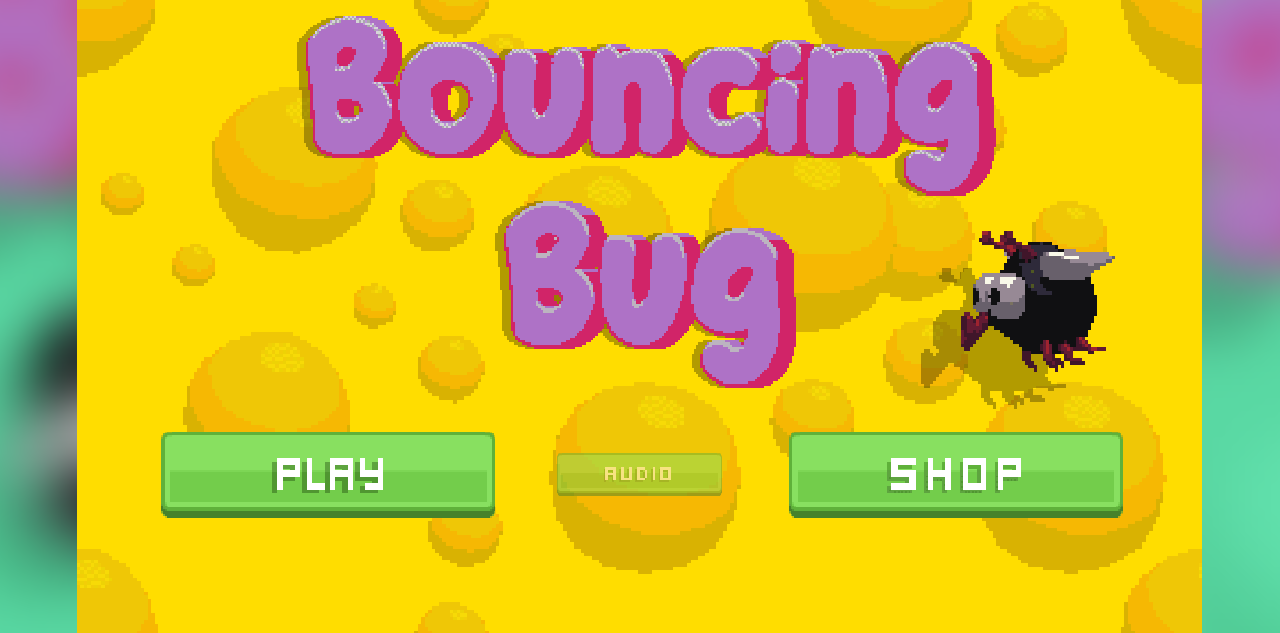
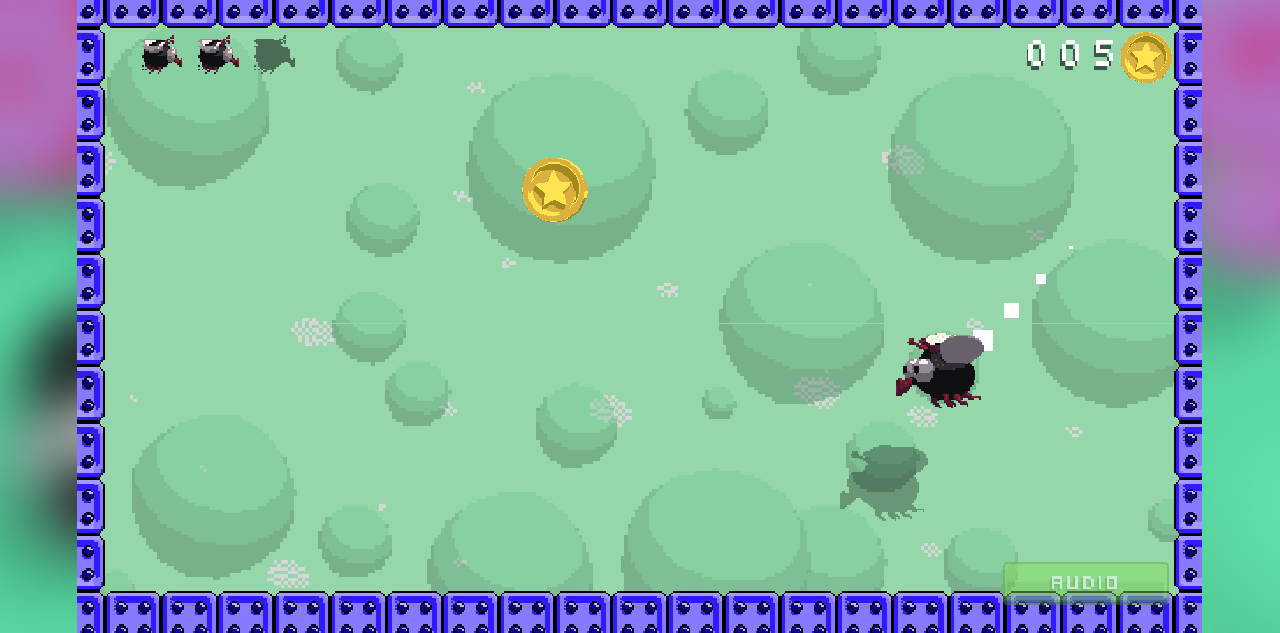
Screenshots captured during our hands-on playtest via the GamePix embed on 2026-04-23. All game assets copyright © Pierpaolo Tausani / PitiGameDev. Used for editorial review purposes only.
How to Play
Use your mouse, keyboard, or touch controls to play this game. Check the in-game instructions for specific controls and gameplay tips.
Game Info
- Category:
- arcade
- Resolution:
- 800 × 600
- Platform:
- Web Browser
- Price:
- Free





More arcade Games
View All arcade Games →Discover more amazing arcade games like Bouncing Bug. All games are free to play online with no downloads required.







Looking for more arcade games? Explore our collection of free arcade games including Among at Easter, BloxdHop, Boing Bang and more. Play instantly in your browser with no registration required.
🎮 More Games You'll Love
More arcade Games
Discover more amazing arcade games like Bouncing Bug. All games are free to play with no downloads required.


Trending Games
Check out these popular games that other players are loving right now!
Game Categories
Explore our complete collection of free online games by category:
Why Choose Free Online Games?
Instant Play: No downloads, no registration, no waiting. Just click and play!
Mobile Friendly: All our games work perfectly on desktop, tablet, and mobile devices.
Always Free: Every game on our site is completely free to play, forever.
Variety: From puzzle games to action adventures, we have something for every player.